
For decades, getting your Permanent Voters Card (PVC) in Nigeria has been synonymous with a classic Nigerian rite of passage: pure, unadulterated stress. We all know the stories, and honestly, too many of us have lived them.
The standard routine usually involves waking up before the birds, rushing down to a chaotic local government INEC office, standing in endless, winding queues, and fighting off the elements—whether that’s the scorching afternoon sun or sudden, heavy downpours.
Think about the stress our parents face. Imagine Mama Ukamaka trying to close her shop at Eke Nibo market early or Papa Nkiru waking up by 4:00 AM just to join a chaotic line at the local government headquarters in Anambra State. For busy professionals, students, and everyday citizens, the massive investment of time and physical energy required just to get registered was enough of a barrier to keep them far away from the ballot box.
But what if you could bypass that headache entirely? Imagine securing your right to vote while sitting on your living room couch, chilling with a cold coke drink with Okpa Nwakaego, using nothing more than your smartphone or laptop.
Thanks to a massive upgrade in digital accessibility, the Independent National Electoral Commission (INEC) has finally flipped the script. The Commission just introduced a fully digital, online Self-Service Registration option built specifically for eligible first-time voters for voter transfer, lost or damaged card.
Back in the day, online pre-registration was only a half-measure; you still had to show up at a physical INEC center to get your fingerprints scanned and your official photo taken. Not anymore. With this tech update, you can complete the entire process including your biometric capture right from your personal digital device.
To sweeten the deal, INEC recognized that millions of Nigerians still need to get on the voter roll, so they approved a two-week extension for the Continuous Voter Registration (CVR) exercise.
If you’ve been making excuses about the long lines and stressful crowds, those excuses officially expire today. This deep-dive guide breaks down the new technology, the strict deadlines you need to beat, and a step-by-step roadmap to getting your voter’s card completely online without stepping a single foot outside.
Mark Your Calendar: Critical Timelines You Can’t Afford to Miss
Before jumping into the portal details, let’s talk timing. Government platforms are famous for slowing down when deadlines approach. Knowing these dates will help you plan ahead and avoid the last-minute server crashes that happen when everyone tries to log in at the same exact moment.
According to the official announcement by Mohammed Kudu Haruna, the National Commissioner and Chair of the Information and Voter Education Committee (IVEC), here are the absolute timelines to remember:
- The Original Deadline: The nationwide CVR drive, which kicked off on August 18th, 2025, was initially set to wrap up on July 10th, 2026.
- The New Extended Deadline: Following critical feedback from political parties, civil society organizations (CSOs), and various state offices, the Commission extended the window by two weeks. The absolute final closing date is now Sunday, 26th July 2026.
- When the Self-Service Portal Opens: The brand-new online self-service platform goes live on Wednesday, 8th July 2026.
This gives you a tight, incredibly valuable window to get everything done from your phone. Don’t wait until July 25th to test it out. Mark July 8th on your calendar and cross it off your to-do list immediately.
The Ultimate Step-by-Step Guide: How to Register Online
Once the portal officially goes live on Wednesday, July 8th, the process is incredibly straightforward. INEC has optimized its web setup to be highly intuitive, so you don’t need to be a software engineer to figure it out.
Follow these precise steps to get registered seamlessly:
Step 1: Fix Up Your Environment and Device
Because this process relies on a live biometric capture via your device’s camera, a little preparation goes a long way. Find a well-lit room natural daylight from a window or a bright overhead light bulb works perfectly. Avoid strong backlighting (like sitting with a bright window directly behind you), as this turns your face into a dark shadow and will cause the system to reject your image. Make sure your internet connection is stable and wipe down your smartphone’s front camera or laptop webcam to clear off any smudges.
Step 2: Head Over to the Official CVR Portal
Open your go-to web browser (Chrome, Safari, or Edge) and type in the official, dedicated INEC CVR portal link: cvr.inecnigeria.org.
A Quick Security Warning: Always make sure you are on the official .gov.ng domain. During major national exercises like this, internet scammers love to set up fake phishing sites that look identical to the real portal just to steal your personal information. Check for the secure padlock icon in your browser’s address bar before typing anything sensitive.
Step 3: Set Up and Verify Your User Profile
If you are brand new to the portal, you will need to create a secure account.
- Click on the “Sign Up” or “Create Account” option.
- Fill in your basic details: full legal name, an active email address, and a functional phone number. For an even quicker start, you can use the secure single sign-on options to log in directly via your existing Google or Facebook account.
- If you choose the email route, look out for a verification link sent straight to your inbox. Click that link to validate your identity, and then log back into the portal dashboard.
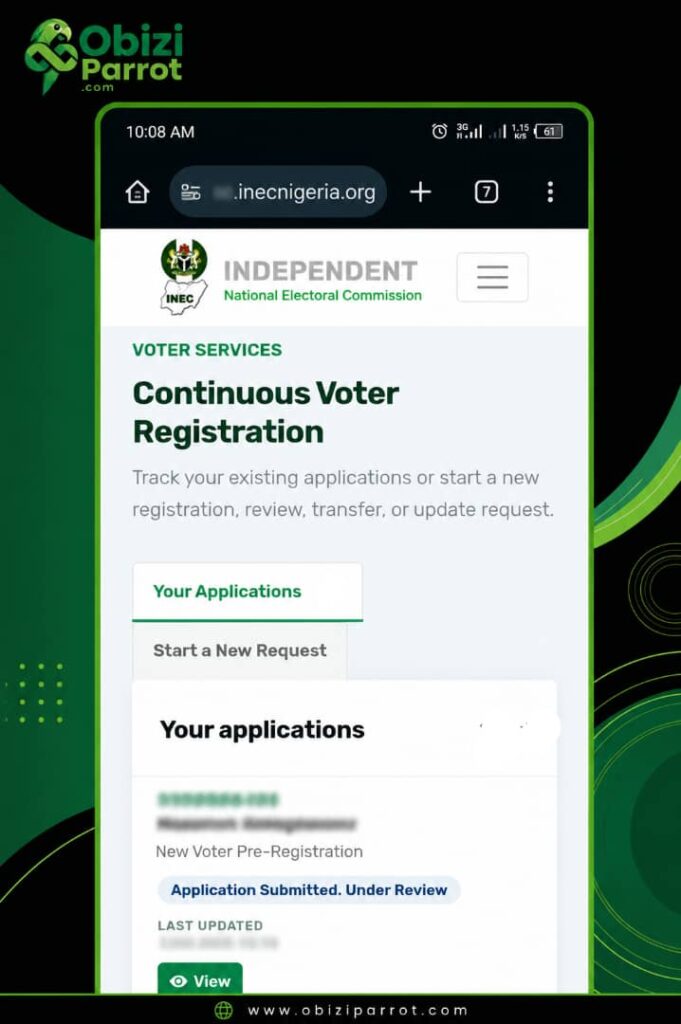
Step 4: Complete Your Bio-Data Form
Once you are inside your personal dashboard, click the option labeled “First-Time Voter Registration”. This opens up a digital questionnaire where you need to input your legal details. Do not rush this part a single typo here can cause massive headaches when your physical card is printed later. You will need to provide:
- Your full legal name (exactly how it appears on your birth certificate or National Identification Number – NIN).
- Your gender, date of birth, and what you do for a living.
- Your State of Origin and Local Government Area (LGA).
- Your current home address.
- Your Preferred Polling Unit: This choice matters. The system will give you a dropdown menu of available polling units based on your state and local government area. For example, if you reside in communities like Mbaukwu, Nibo, Nise, Amawbia, Isiagu or Umuawulu make sure to choose a polling unit that is closest to your immediate neighborhood or easy to reach on election day, because that is the exact spot you will need to physically visit to cast your ballot.
Step 5: The Digital Biometric Capture (The Magic Part)
Historically, this was the exact step where the online process stopped, forcing you to travel down to an INEC office just to stand in a queue for fingerprinting. Now, you can handle it right on the spot.
- The portal will pop up a request to access your device’s camera. Go ahead and click “Allow.”
- An on-screen frame will appear with your live camera view. Position your face squarely inside the designated oval outline.
- Make sure you aren’t wearing hats, sunglasses, chunky headphones, or anything that hides your facial features. Keep your expression completely neutral (no massive smiles or exaggerated frowns) and look straight into the camera lens.
- The system’s AI automatically checks your lighting, tracks your facial position, and securely locks in your biometric data. Follow any extra prompts on the screen, which might include blinking or turning your head slightly to prove you are a living human being and not just a static photo held up to the screen.
Step 6: Final Review and Submission
Before hitting that final submit button, the portal will display a summary page showing all your typed data alongside your captured photo. Read through every single line with care. Make sure your name is spelled perfectly and your birthdate is 100% accurate. Once you are confident everything is correct, click “Submit Application.”
Step 7: Save Your Registration Slip
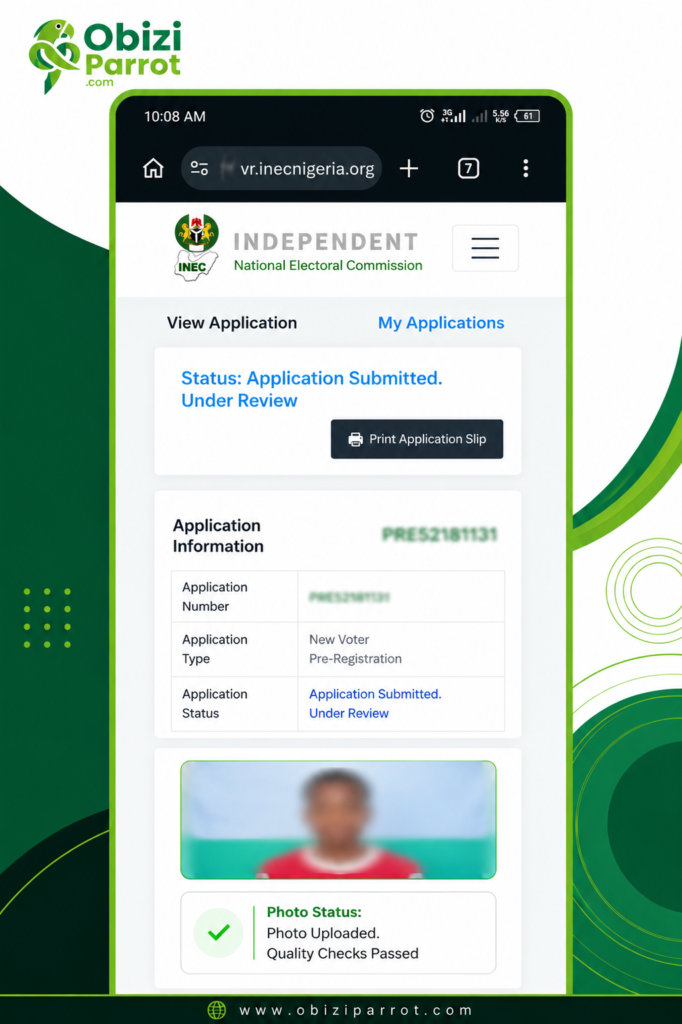
After you hit submit, the system processes your files through its backend servers. If everything checks out, the portal will instantly generate a temporary Voter Registration Slip complete with a unique application number and a tracking QR code. Download this PDF straight to your phone or laptop, and print out a hard copy if you can. This slip serves as your official proof of registration until your physical Permanent Voter’s Card (PVC) is printed and ready for pickup.
Is the Online Biometric Capture Actually Secure?
Whenever a critical government process goes completely digital, questions about security, identity theft, and fraud are totally normal. It makes sense to wonder: Can someone register multiple times using fake accounts? Can people upload random photos to mess up the registry?
INEC planned ahead for these exact loopholes. The Commission made it clear that this self-service setup isn’t just blindly taking in data; it uses a highly advanced, multi-layered security backend.
When you submit your biometric photo, the platform runs it through an automated Automated Biometric Identification System (ABIS). This system automatically matches your facial biometrics against the national database to immediately spot and kick out duplicate registrations. On top of that, the backend integrity checks are optimized to catch deepfakes, pre-recorded videos, or static printouts. If the system catches anything suspicious or mismatched, the application is flagged for manual eyes or rejected entirely. This keeps the National Register of Voters completely accurate and credible.
Who Can Actually Use This Online Option?
It is incredibly important to know exactly who this digital update is meant for so you don’t spend time attempting a process that doesn’t match your voter status.
- First-Time Voters (The Main Target): This fully remote, home-based self-service option is built exclusively for new voters. To qualify, you must be a Nigerian citizen, at least 18 years old by the time you register, and you must have never registered for a voter’s card anywhere in Nigeria before.
- Existing Registered Voters (People Who Already Have PVCs): If you already possess a PVC but recently moved to a new neighborhood, spotted a bad typo on your voter profile, or lost/damaged your physical card, this new home-registration track isn’t for you. But here’s the good news: you still don’t need to visit an INEC office! You can use the exact same cvr.inecnigeria.org portal to quickly file for a Voter Transfer, Information Correction, or Card Replacement. Since your records are already sitting in the central database, your path simply involves updating your current info rather than building a brand-new voter profile from scratch.
Let Us Help You or Your Community Get Registered!
We completely understand that dealing with brand-new online platforms can feel a bit overwhelming at times, and not everyone has access to a rock-solid internet connection or a smartphone with a pristine front camera. We want to make sure you don’t face it alone.
- For Individuals: If you hit a roadblock on the site, get stuck trying to pass the online biometric face capture, or just want someone to walk you through the form steps, please reach out. We are happy to help you navigate the portal completely free of charge.
- For Communities, Churches, and Organizations: Want to make sure your entire neighborhood, local estate, or youth group gets successfully on the voter roll? Whether you are in town or in locations in Anambra, contact us to set up a Community Voter Drive. We can bring stable internet equipment and clear capture devices straight to your location to help elderly neighbors like Papa Nkiru or busy market women like Mama Ukamaka get their registration done quickly and smoothly before the July 26th deadline.
How to reach us: Drop a comment right underneath this post, or pop over to our official [Contact Us Page] to send a direct message. Let’s team up to make sure nobody gets left behind!
Final Thoughts: The Ball Is In Your Court
By removing the requirement to travel down to an INEC registration center just to capture biometrics, the Commission has broken down the biggest hurdle keeping everyday citizens out of the democratic loop. The old complaints about losing an entire workday, dealing with chaotic logistics, and surviving exhausting lines are officially dead.
Technology has brought our democratic process straight to our fingertips. The timeline is tight—running strictly from Wednesday, 8th July 2026 to Sunday, 26th July 2026.
Now that the entire process costs nothing more than a couple of megabytes and roughly fifteen minutes of your day, there are zero excuses left. Set a loud reminder on your phone, pass this detailed guide along to your group chats, family, and colleagues, and let’s own our future together. Log on, get registered, and let your voice be heard!
What’s your take on INEC’s new online biometric registration system? Do you think this will drastically boost voter turnout among young Nigerians? Let us know your thoughts, questions, or any portal issues you encounter in the comments section below!
This Voter Registration Deadline Extension Video explains the context behind the two-week extension approved by INEC for the ongoing registration drive.